ip
Pat User Guide
Pat is a CLI chatbot that helps you keep track of your tasks and your progress. Inspired by Patrick Star.
Saving Your List
Your list will be saved every time a command that modifies it is executed (such as todo, mark, and delete), and upon using the bye command.
Ending the Chat: bye
Ends your chat with Pat and tries to save your list in ./data/list.txt.
Format: bye
Example output:
Directory "data" created.
File "list.txt" created.
Bye! Remember, this is Pat!
Adding Todos: todo
Adds a simple Todo with only a description of the task to the task list.
Format: todo [description]
Example: Assuming the list initially had 5 items, todo Watch Dune returns
Added this task:
    [T][ ] Watch Dune
Now you have 6 tasks in the list
Adding Deadlines: deadline
Adds a Deadline with a task description and a deadline by which it should be completed by to the task list.
Format: deadline [description] /by [deadline]
Example: Assuming the list initially had 5 items, deadline Cook pancakes /by 9am returns
Added this task:
    [D][ ] Cook pancakes (by: 9am)
Now you have 6 tasks in the list
Adding Events: event
Adds an Event with a task description and a start and stop time to the task list.
Format: event [description] /from [start time] /to [end time]
Example: Assuming the list initially had 5 items, event Attend lecture /from 10am /to 12pm returns
Added this task:
    [E][ ] Attend lecture (from: 10am to: 12pm)
Now you have 6 tasks in the list
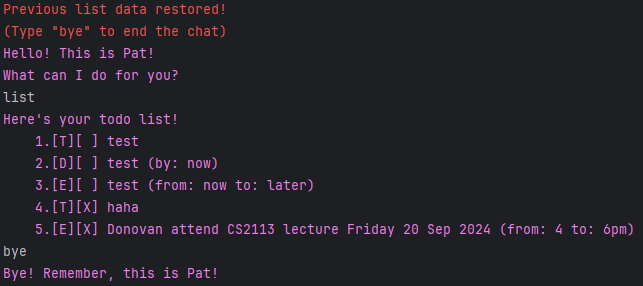
Listing All Tasks: list
Shows a list of all tasks in the list.
Format: list
Example:
Here's your todo list!
    1.[T][ ] test
    2.[D][ ] test (by: now)
    3.[E][ ] test (from: now to: later)
    4.[T][X] haha
    5.[E][X] Donovan attend CS2113 lecture Friday 20 Sep 2024 (from: 4 to: 6pm)
Finding Tasks: find
Finds task whose description contains the provided key phrase. The task number of the tasks found are notably the same as their number in the task list.
Format: find [key phrase]
Example: From the list example above,
find testreturnsHere are the matching tasks in your list: 1.[T][ ] test 2.[D][ ] test (by: now) 3.[E][ ] test (from: now to: later)find ereturnsHere are the matching tasks in your list: 1.[T][ ] test 2.[D][ ] test (by: now) 3.[E][ ] test (from: now to: later) 5.[E][X] Donovan attend CS2113 lecture Friday 20 Sep 2024 (from: 4 to: 6pm)find 13returnsHere are the matching tasks in your list: 5.[E][X] Donovan attend CS2113 lecture Friday 20 Sep 2024 (from: 4 to: 6pm)
Deleting Tasks: delete
Deletes the task with the specified number from the task list.
Format: delete [task number]
Example: delete 2 deletes the 2nd task in the task list according to the list or find commands.
Marking Tasks as Done: mark
Marks the task with the specified number from the task list as done.
Format: mark [task number]
Example: mark 3 marks the 3rd task in the task list according to the list or find commands as done.
Unmarking Tasks as Not Done: unmark
Unmarks the task with the specified number from the task list as not done.
Format: unmark [task number]
Example: unmark 3 unmarks the 3rd task in the task list according to the list or find commands as not done.